Docs / Guide
Alerts
Set a condition on the chart and get told when it happens — checked on our servers, so it fires with your browser closed and the notification reaches you in Telegram.
Updated
The server watches, not your tab
An alert is a question you leave running: tell me when price crosses this level, or tell me when someone buys more than two million dollars at once. The condition is checked on our servers, not in the page you have open, so it holds whether the tab is in the background, the laptop is shut or the browser was never opened that day.
That is the whole reason alerts work the way they do. Anything the chart computes in your browser — a moving average, RSI, MACD — has nothing watching it while you are away, so those cannot be alerted on yet. What can be alerted on is what the server already measures for itself.
Alerts belong to an account, so this is one of the few things a guest cannot set up.
Two conditions today
Price crossing. A price level and a direction: upwards, downwards or either way. Crossing means changing sides, not touching — and a chatter guard, counted in the instrument’s own ticks, says how far past the level price has to go before it counts. When you create the alert the current side is read from the market and is never treated as a crossing, so an alert placed just under the price does not fire the moment you save it.
Whale trade — Big trade in the condition list. One participant’s aggression above a size you pick, reconstructed from the exchange’s fragments the same way the bubbles on the chart are, and measured the same way too: what is weighed against your size is the busiest hundredth of a second inside it, not everything the sweep touched on its way through the book. Leave the size empty and the instrument’s own threshold is used, which is the number the chart is already drawing bubbles from.
More conditions are on the roadmap: iceberg refills, Volume Profile levels, absorption. Each one arrives when the server can count it as a discrete event — that is the same rule that keeps the browser-side indicators out.
Placing one on the chart
Right-click the price scale, or the chart itself, and choose Alert on this
level: the price under the pointer is filled in for you, snapped to a price the
instrument can actually quote. You can also open the alerts panel from the right
edge of the terminal and start from the + button there.
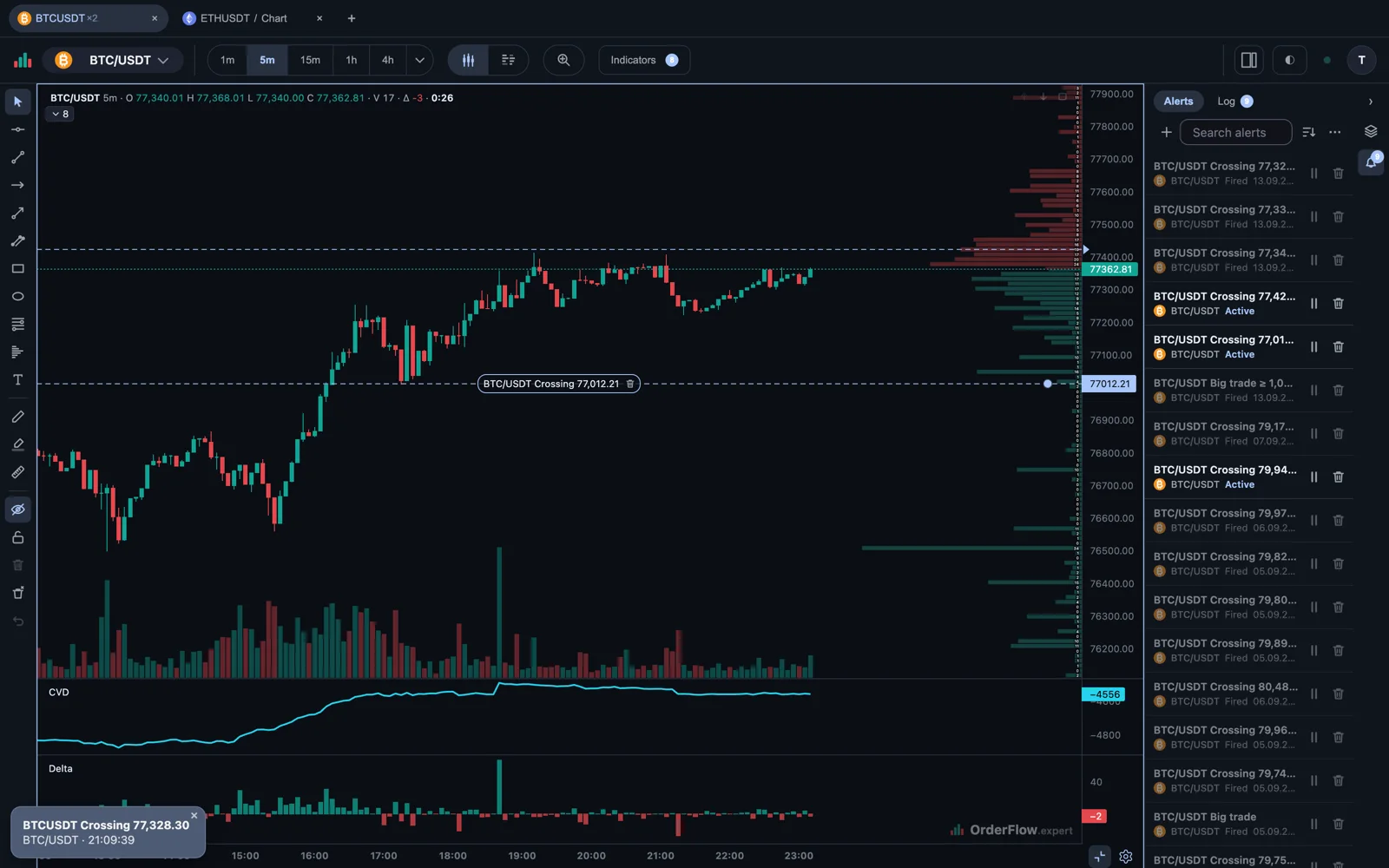
A price alert then lives on the chart as a dashed line with a triangle on the price scale. Point at it to see the rule’s own title, click to select it, drag it to a new level, or double-click to open its settings. Dragging is the fastest way to move a level as the market moves, and it saves as soon as you let go. A one-shot alert takes its line off the chart the moment it fires — it has nothing left to watch, and the entry in the log is where it went.
How often, and until when
Every alert says how often it may fire — once, or every time — and can carry a pause between notifications, so a level that gets tested repeatedly does not turn into a stream of messages. Quiet hours stop the push without stopping the record: the firing still lands in the log, it just does not wake you.
An account can hold thirty alerts at once, across at most five instruments. Alerts that have finished — a one-shot that fired, or one that reached its expiry — do not count against either, and the panel keeps them in a group of their own below the live ones.
A rule can also be given an expiry: end of day, a week, a month or a date you pick. The expiry is counted on the chart’s own clock — the timezone set on the chart’s time axis — and the date it resolves to is printed beside the field, so there is nothing to work out in your head.
Where the notification goes
Inside the terminal a firing is a message in the corner plus an entry in the alerts panel’s log, with an unread count on the panel’s icon so a firing you missed is still visible when you come back. Several at once stack into a deck with the count on it, which opens into the full list rather than burying the chart. The log holds a month, and you can clear it sooner. Each alert can carry its own sound, chosen from a short list, playing once or repeating for a few seconds.
Outside the terminal there is Telegram. Connect the chat once in user settings — the Alerts section — and each alert decides for itself whether to use it. The message carries the event, the symbol, the price, the time and a button that opens the terminal.
Browser push is planned as a second channel; email, SMS and webhooks are not.